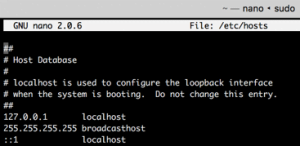
 What is the HOSTS file?
The HOSTS file is used by your computer’s Operating System (Windows, OS X, Linux, etc) to map hostnames to IP Addresses. In layman’s terms your computer will check this file for any domain it needs to resolve to an IP Address prior to querying public DNS resolvers. The HOSTS file can be used to point a domain name to an IP Address regardless of the DNS settings for the domain.
An example of a HOSTS entry to load “www.example.com” and “example.com” from the IP address “93.184.216.34“:
93.184.216.34 www.example.com example.com
Windows may require two separate lines like so:
93.184.216.34    www.example.com

93.184.216.34    example.com
When the above records are added to your HOSTS file the result is that if you try to load that domain in your browser it will connect to that IP to make the request. If you try pinging the domain you will find that it pings that IP as well. What this means is that you can use this to test your site on a new server before you point your world-wide DNS there. Continue reading “What is the HOSTS file & when should I use it?”


 AutoSSL is going to change how webmasters secure data transferred to and from their sites. For the longest time SSL was an additional expense that many webmasters chose to forego as it wasn’t required for the operation of their websites. The time when not having SSL is the norm for most sites is coming to an end. Generally SSL has been reserved for usage by those that send or receive private information such as your name, address, email address, and phone number or even your credit card information.
 We recently identified a bug in the latest versions of WHMCS including version 6.3.1. The bug consists of unexpected behavior when modifying a client’s product details and using the “Enter” key to submit the changes when the product is a cPanel Account. In previous versions of WHMCS you could change a field, such as the renewal price, and press “Enter” to submit the form. Over the years we had become accustomed to changing client product settings in this manner as we found it was the most efficient way to do it.