 AutoSSL is going to change how webmasters secure data transferred to and from their sites. For the longest time SSL was an additional expense that many webmasters chose to forego as it wasn’t required for the operation of their websites. The time when not having SSL is the norm for most sites is coming to an end. Generally SSL has been reserved for usage by those that send or receive private information such as your name, address, email address, and phone number or even your credit card information.
Google and other search engines are already giving preferable ranking to sites with SSL. For quite some time we’ve offered Let’s Encrypt to our customers so that everybody has access to freely accessible SSL for any site they wish. cPanel has taken this a step further and created what they refer to as AutoSSL. AutoSSL generates and installs a domain validated SSL certificate on all active domains on a server that are not already protected with SSL. Continue reading “cPanel AutoSSL – Automatic Free SSL for All Domains”
 We recently identified a bug in the latest versions of WHMCS including version 6.3.1. The bug consists of unexpected behavior when modifying a client’s product details and using the “Enter” key to submit the changes when the product is a cPanel Account. In previous versions of WHMCS you could change a field, such as the renewal price, and press “Enter” to submit the form. Over the years we had become accustomed to changing client product settings in this manner as we found it was the most efficient way to do it.
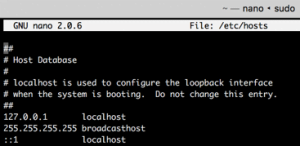 What is the HOSTS file?
 Over the last few years I have seen more accounts compromised due to outdated default themes like “Twenty Twelve”, “Twenty Thirteen”, “Twenty Fourteen”, etc. When a user installs a new copy of WordPress more often than not they proceed to install a new theme that they prefer over the default offerings. The big issue is the result of two missing steps that all webmasters should perform.
 I want to start out by saying that not having a limit does not mean infinite usage is possible. We’re all smart enough to know that no matter what storage technology we’re using to power your sites there will ultimately be a finite limit. What “Unlimited Storage” means to us is being free from an arbitrary limit that you have to keep in mind and be careful not to cross. There are several analogies I can make but the best that I can make is to “Unlimited Calling” on cellular providers.